Potential operating-cost reduction
Modeled from removing individual printer ownership and consumables, consolidating service, and eliminating the dedicated print-room function.
04 / International School
A slow, centralized copy-room service became secure printing from any device to any of ten convenient printers—with less waiting, less waste, and predictable operating costs.
The problem
Teachers sent requests to one employee, then waited for printing to be produced and delivered. Misunderstood instructions caused reprints, while individual office printers added equipment, toner, maintenance, and support costs. Teacher time and a dedicated printing role were absorbed by a process that still felt slow and frustrating.
What changed
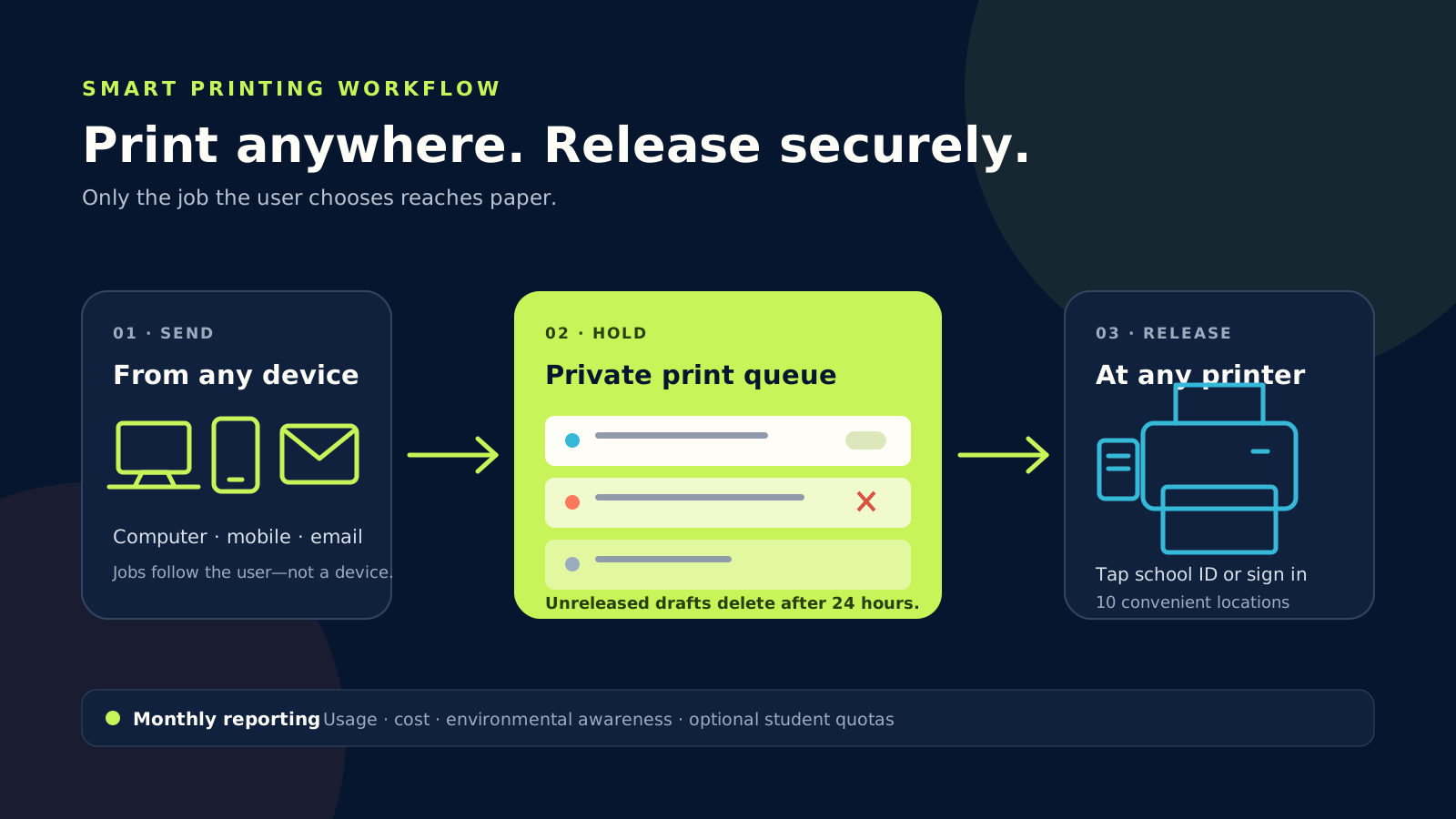
SchoolOptimize gathered usage and cost data, then designed a managed printing model with ten printers and copiers distributed around the school. Staff can print from a computer, mobile device, or email. Every job waits in the user's private queue until they authenticate at any device using their school ID card or Active Directory credentials.
If one device is busy or unavailable, the user can release the job at another location. This removes the school's dependency on one room, one printer, or one employee.
The new model
Users can review multiple drafts and release only the final version. Anything left in the queue is deleted automatically after 24 hours, preventing forgotten documents from reaching output trays. The school pays per printed page instead of owning the maintenance, toner, and consumables burden.
Central controls can support duplex and black-and-white defaults, color restrictions, and student quotas. Monthly usage, cost, device, and environmental reports give the school one view of the entire printing environment.
Implementation
The four-week rollout covered the print server, device deployment, card and directory integration, testing, launch, user guidance, and post-launch monitoring. The printing staff function was no longer required, while teachers gained direct control of their own jobs.
SchoolOptimize's role
We analyzed the existing process, built the financial case, designed the operating model, coordinated the solution, integrated identity and directory services, managed the rollout, supported users, and monitored adoption.
Planning model
These are conservative estimates based on the process design—not verified client results. Final figures should be replaced with invoice, payroll, and print-server data.
Modeled from removing individual printer ownership and consumables, consolidating service, and eliminating the dedicated print-room function.
Estimated time no longer spent preparing instructions, following up, waiting for delivery, or correcting misunderstood jobs.
Modeled from secure release, choosing only the final draft, and automatically deleting abandoned jobs after 24 hours.
How we validate: compare the former printer, toner, maintenance, outsourcing, staffing, and estimated teacher-time costs with pay-per-click invoices and monthly print-server reports.
Operating model
Teachers can use another device if one is busy or unavailable—without depending on a single copy room.
Confidential documents print only after the owner authenticates, reducing abandoned output.
Pay-per-click replaces separate maintenance, toner, consumables, and desktop-printer costs.
Monthly reports and optional student quotas make cost and environmental impact easier to manage.
What hidden cost is slowing your school down?
Book a free conversation